Post: Here is a userbar i made
12-24-2008, 11:29 PM #1
prodrive1
Error… Cat invasion!
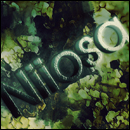
(adsbygoogle = window.adsbygoogle || []).push({}); Here is my first attempt at a user bar:

You must login or register to view this content.

RATE OR HATE
(adsbygoogle = window.adsbygoogle || []).push({});
12-25-2008, 04:08 AM #2
It's too big for a userbar. Also I don't like the way the colors are put there just very messy and the text is kind of basic. I guess just look on youtube or google on how to make a userbar.
12-25-2008, 04:23 AM #3
It looks random, too long and needs better text and finishing effects.
12-25-2008, 04:48 AM #4
llGrantll
One King
Good start... Build from that!
12-25-2008, 09:48 AM #5
Lol you should really download some fonts I hate default fonts from windows when making sigs and as matt already stated it is far too big and messy nice for a first though Smile
12-25-2008, 11:15 AM #6
There is no scanlines, it is too big and there is no 'gloss' effect.
12-25-2008, 02:04 PM #7
xJCMx
League Champion
Originally posted by pp.Matt View Post
It's too big for a userbar. Also I don't like the way the colors are put there just very messy and the text is kind of basic. I guess just look on youtube or google on how to make a userbar.


100% Agreed!
12-25-2008, 06:40 PM #8
try adding scanlines. a glossy look and erm. yeh download some texts
12-26-2008, 01:13 PM #9
Yep download the font forgot what its called but its really good for userbars, you should make scan lines, lower the opacity of the colours and overlay the colours with scanlines and why is there no border on the right side, good for a start Winky Winky
EDIT: k remembered the name of the really good font its called Visitor they come in a pack of three diffrent fonts.
12-26-2008, 02:08 PM #10
its not bad its just a little to big.
but good try. =)

Copyright © 2026, NextGenUpdate.
All Rights Reserved.

Gray NextGenUpdate Logo