Post: Ninja Sig!
Options
02-13-2009, 05:51 AM
#1
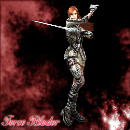
N*S-DYN0MiiT3x
Brute

02-13-2009, 05:58 AM
#3
N*S-DYN0MiiT3x
Brute
Originally posted by John0090

Get rid of the glow around him, don't like the rounded border, uh... Text, looks like just c4d's.
Download the brushes I posted etc etc,
Look at tutorials blah blah blah, lol
Skill rating: 7/10
Actual rating: 4/10
Download the brushes I posted etc etc,
Look at tutorials blah blah blah, lol
Skill rating: 7/10
Actual rating: 4/10
Lol, thanks, this is a really bad one, I'm really disapointed in it, I don't even think I shoulda posted it!

02-13-2009, 02:51 PM
#5
N*S-DYN0MiiT3x
Brute
Originally posted by lordafi
Hmm, I doln't remember your other sigs, this one looks ok for a beginner.
Some tips:
Never put outline glow around the render. Use brushes, add light source(s), don't make you background completely out of c4d's.
Some tips:
Never put outline glow around the render. Use brushes, add light source(s), don't make you background completely out of c4d's.
Lol, if C4D's are brushes, I use them. I only use brushes, not C4D, and I dont know how to use light sources and stuff, but yeah! I did find this sig very disapointing!

Copyright © 2026, NextGenUpdate.
All Rights Reserved.
